How to Get FAB Bank Statement Online through Website & App [2026 UAE Guide]
Digital banking services in the UAE have made managing your bank records much simpler. You can save time and effort by accessing your bank statement online, whether you need evidence of income, paperwork for a visa application, loan approval, lease contract, or just want to analyze your recent activities.
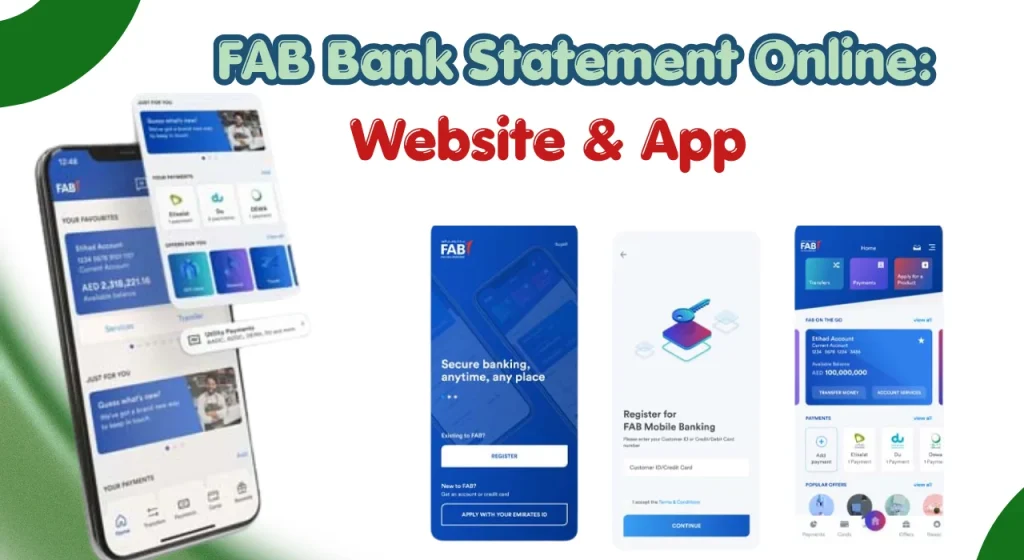
Most statements are available instantly and can be downloaded in PDF format for personal or official use.
Khaleej Buzz explains everything UAE residents need to know about obtaining a bank statement online, including website access, mobile app methods, downloading options, security tips, and troubleshooting solutions.
What Is a Bank Statement and Why Is It Important?
An official record of every transaction made in a bank account during a given time period is called a bank statement. It offers a thorough overview of Fab account balances, charges, transfers, withdrawals, and deposits.
Because they enable account holders to keep accurate financial records, track spending, confirm payments, and identify illicit transactions, bank statements are crucial.
In the UAE, Fab bank statements are often requested by employers, landlords, government authorities, financial institutions, and immigration departments as proof of financial activity.
Also Read: FAB Bank Balance Check Online
What Information Is Included in a Bank Statement?
A typical bank statement contains several important details that help account holders understand their account activity.
Account Details
The statement usually displays:
Deposits and Credits
This section shows all incoming funds, including:
Withdrawals and Debits
Outgoing transactions generally include:
Fees and Charges
Banks may list charges such as:
Salary Transfers
Many UAE residents use their statements to verify salary deposits. Salary entries typically include:
Closing and Opening Balances
Statements normally display:
Common Uses of Bank Statements in the UAE
Bank statements serve many practical purposes for individuals and businesses throughout the UAE.
Requirements Before Accessing Your Bank Statement Online
Before attempting to retrieve a statement online, make sure you meet several basic requirements.
Also Read: How to Check PayPlus Card Balance Online
How to Get a Bank Statement Online Through Internet Banking
Internet banking remains one of the easiest ways to access account statements. Most customers can retrieve statements within minutes using a computer, laptop, or tablet.
Follow the steps below.
Step 1: Sign In to Online Banking
Visit the bank’s official online banking portal and enter your login credentials.
You may also be required to complete a one-time password (OTP) verification process for security purposes.
Always confirm that you are using the official banking website before entering sensitive information.
Step 2: Navigate to the Accounts Section
After logging in, locate the main dashboard.
Step 3: Open the Statements or e-Statements Menu
Within the selected account, look for options such as:
The exact wording may vary depending on the banking platform.
Step 4: Select the Required Account
Customers with multiple accounts should carefully choose the correct account.
Examples include:
Selecting the correct account ensures the statement contains the intended transaction records.
Step 5: Choose the Statement Period
Most online banking systems allow users to select a custom statement period.
Common options include:
Choose the period that matches your requirement.
For example:
- Visa applications often require recent months.
- Loan applications may request several months of transaction history.
- Personal budgeting may require a full year of records.
Step 6: Generate and View the Statement
After selecting the desired date range, click the generate or view statement option.
The system will typically display:
Review the information carefully before downloading.
Step 7: Download the Statement
Most online banking platforms offer downloadable statement formats such as:
- Excel
- CSV
PDF remains the most commonly accepted format for official documentation.
When downloading the file:
Step 8: Save or Print the Statement
Once downloaded, you can:
If an organisation requires an official stamped statement, you may need to request a certified version separately through branch services or customer support.
How to Get a Bank Statement Through the Mobile Banking App
Mobile banking apps have become one of the most convenient ways to access account information in the UAE.
Most banking apps provide the same statement features available through internet banking, along with additional tools such as transaction alerts and e-statement notifications.
Step 1: Download and Install the Mobile Banking App
If you have not already installed the banking application, download it from:
- Google Play Store (Android)
- Apple App Store (iPhone)
Always install the official application published by your bank to avoid security risks.
After installation, ensure the app is updated to the latest version for the best performance and security.
Step 2: Log In Securely
Open the application and sign in using your:
- Username
- Password
- Biometric authentication (if enabled)
- OTP verification code
Many UAE banks now support fingerprint and facial recognition for quicker access.
Step 3: Access the Account Dashboard
After logging in, you will be directed to the main dashboard.
This section usually displays:
Select the account for which you need a statement.
Step 4: Locate the Statements Section
Most mobile banking applications include a dedicated section labelled:
Tap on the appropriate option to proceed.
Step 5: Select a Date Range
Choose the period you want the statement to cover.
Common options include:
Selecting the correct period ensures you receive the required records for official or personal use.
Step 6: View the Statement
The application will generate the statement and display transaction details directly on your screen.
Review:
- Credits
- Debits
- Transfers
- Fees
- Account balances
Make sure all information appears accurate before downloading.
Step 7: Download, Save, or Share the Statement
Most banking applications allow you to:
- Download PDF statements
- Save files to your device
- Share documents through email
- Store files in secure cloud storage
Always check the statement before sending it to third parties.
Step 8: Enable e-Statement Notifications
Many banks offer electronic statement alerts.
Enabling notifications allows you to:
How to Download a Bank Statement
Downloading your statement ensures you have a copy available whenever needed.
Downloading Statements in PDF Format
PDF statements are the most commonly accepted format for:
Benefits of PDF statements include:
Saving Statements to Mobile Devices
When saving statements on your phone:
Sensitive financial records should always be protected.
How to Email or Share Your Bank Statement Securely
Sharing a bank statement requires caution because it contains sensitive financial information.
Before sending a statement:
If you are sending statements related to Hafilat recharge for official UAE applications, always verify the organisation’s document requirements beforehand.
Alternative Ways to Obtain a Bank Statement
Online banking is convenient, but there are situations where customers may need alternative methods.
| Alternative Method | Description |
| Requesting a Statement at a Branch | Visit a bank branch to obtain printed, historical, or certified statements. You may need to provide your Emirates ID, debit card, or account details, and service charges may apply. |
| Getting a Stamped or Certified Bank Statement | A stamped statement is an official bank-issued document commonly required for loans, visas, immigration, business licensing, or legal purposes. Some banks may offer digital certification, while others require a branch visit. |
| ATM Mini Statement | An ATM mini statement provides a quick summary of recent transactions, including deposits, withdrawals, dates, and current balance. It is useful for basic account checks but does not include detailed transaction history. |
| Requesting Statements Through Customer Support | Customers can request statements or resolve statement-related issues through telephone banking, email support, mobile banking chat, or branch assistance when online access is unavailable. |
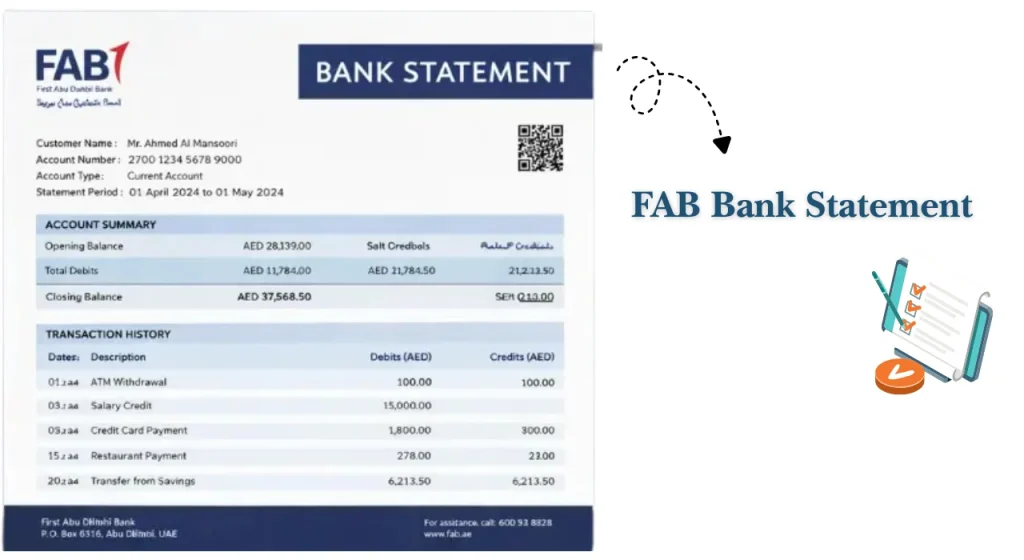
Understanding Your Bank Statement
Knowing how to read your statement helps you monitor your finances more effectively.
Account Summary Section
The account summary provides a quick overview of:
This section gives a snapshot of your financial activity during the statement period.
Transaction History
The transaction section lists every activity recorded within the selected period.
Common transaction entries include:
Reviewing transactions regularly helps identify unusual activity quickly.
Pending Transactions
Some transactions may appear as pending before final settlement.
Examples include:
- Card purchases
- Hotel deposits
- Fuel station pre-authorisations
- Online orders
Pending entries may affect your available balance temporarily.
Salary Credits and Transfers
Salary entries are especially important for UAE employees.
These transactions can be used for:
Regular salary deposits also help demonstrate financial stability.
Charges, Fees, and Deductions
Statements may include charges such as:
Reviewing fees regularly can help reduce unnecessary banking costs.
Identifying Unauthorised Transactions
Check for:
If suspicious activity appears, contact customer support immediately.
The UAE government also provides cyber safety guidance through:
Reconciling Your Monthly Statement
Statement reconciliation means comparing your records against bank transactions.
This helps you:
Monthly reconciliation is recommended for both individuals and businesses.
Benefits of Accessing Bank Statements Online
Online statements offer several advantages over traditional paper statements.
These benefits make online statements the preferred option for most modern banking customers.
Common Problems & Their Solutions
Although online banking is generally reliable, occasional issues may occur.
| Problem | Possible Solution |
| Forgot Username | Use account recovery tools or contact support |
| Forgot Password | Reset through OTP verification |
| Account Locked | Contact customer service for account recovery |
| Statement Not Loading | Check internet connection and try again |
| Download Error | Update browser or mobile app |
| Missing Transactions | Wait for processing and refresh account data |
| Wrong Date Range | Generate a new statement with correct dates |
| Mobile App Issue | Install the latest app version |
| Browser Problem | Switch to a supported browser |
| File Not Opening | Install a PDF or Excel reader |
How to Recover Online Banking Access
Losing access to online banking can be frustrating, but recovery is usually straightforward.
Most banks provide self-service recovery options through their digital channels.
Common recovery methods include:
If self-service recovery does not work, customers may need to visit a branch with identification documents.
Security Tips for Viewing and Downloading Bank Statements Online
Bank statements contain sensitive financial information. Following good security practices helps protect your personal and banking data from unauthorized access.
Best Practices for Managing Digital Bank Statements
Organizing your statements makes it much easier to access them later on, particularly whether you’re looking for tenancy agreements, loans, or visas.
Adhere to these easy habits:
Good record management can save significant time when documents are needed urgently.
Bank Statement vs Mini Statement: Key Differences
Many customers confuse a full bank statement with an ATM mini statement. Although both provide account information, they serve different purposes.
Information Included
A full bank statement contains:
- Complete transaction history
- Opening and closing balances
- Salary deposits
- Transfers
- Charges and fees
A mini statement typically contains only recent transactions.
Transaction History Coverage
Full statements may cover:
- One month
- Several months
- A custom date range
- Historical account activity
Mini statements generally display only a limited number of recent transactions.
Availability and Accessibility
Full statements are usually available through:
- Online banking
- Mobile banking
- Branch requests
- Customer support channels
Mini statements are commonly available through ATMs.
Best Use Cases for Each Option
| Feature | Full Bank Statement | Mini Statement |
| Transaction Details | Complete | Limited |
| Statement Period | Customisable | Recent Transactions Only |
| Suitable for Visa Applications | Yes | No |
| Suitable for Loan Applications | Yes | No |
| Available Through ATM | Usually No | Yes |
| Available Online | Yes | Limited |
| Official Documentation | Yes | No |
For most official purposes in the UAE, a full bank statement is required rather than a mini statement.
Customer Support Options for Statement-Related Issues
If you experience difficulties accessing your statement, several support options are available.
Online Banking Support
Most banks provide dedicated support for:
- Login problems
- Statement generation issues
- Download errors
- Security concerns
Support resources are often available through official banking websites.
Mobile Banking Support
Mobile app users can usually obtain assistance through:
- In-app chat services
- Help centres
- Support forms
- Mobile banking FAQs
This is often the fastest method for resolving app-related issues.
Email and Digital Support Channels
Many banks also offer support through:
- Email services
- Online contact forms
- Secure messaging systems
- Digital help centres
Always use official communication channels to protect your information.
Conclusion
Getting a bank statement online is one of the simplest banking services available to UAE customers in 2026. Whether you use internet banking, a mobile banking app, customer support, or branch services, statements can usually be accessed within minutes.
Online statements help with salary verification, visa applications, tenancy approvals, loan requests, budgeting, and business record keeping. They also provide a secure and convenient way to monitor account activity without relying on paper documents.
FAQs
How long does it take to generate an online bank statement?
In most cases, statements are generated instantly. Larger date ranges or historical records may take slightly longer depending on the banking system.
Can I download multiple months of statements at once?
Many online banking platforms allow customers to select a custom date range and download several months of statements in a single file.
Can I get a stamped bank statement online?
Some banks offer digitally certified statements. However, certain institutions may still require customers to visit a branch for an officially stamped copy.
How can I access bank statements from outside the UAE?
Customers can usually access statements through online banking or mobile banking from anywhere in the world, provided they have internet access and valid login credentials.
Can I download statements in Excel format?
Many banks provide statement downloads in both PDF and Excel formats. Availability may vary depending on the account type and banking platform.
Can I email my statement directly from the banking app?
Most modern banking applications include options to download, save, or share statements through email and other secure channels.
What should I do if I cannot log in to online banking?
Use the password recovery or username recovery feature. If the issue continues, contact customer support or visit a branch for assistance.
Are online bank statements legally valid in the UAE?
Yes. Online bank statements are generally accepted for many official purposes. However, some organisations may specifically request a stamped or certified statement.
Can business account holders access statements online?
Yes. Most business and corporate banking customers can access account statements through internet banking and mobile banking services.
How do I identify unauthorised transactions on my statement?
Review transaction descriptions carefully and look for unfamiliar purchases, transfers, withdrawals, or duplicate charges. Report suspicious activity immediately.
Can I print my downloaded bank statement?
Yes. Downloaded PDF statements can usually be printed and submitted wherever physical copies are required.
How do I request an official stamped statement for visa or loan purposes?
Contact customer support or visit a branch and request a certified or stamped statement. You may need to provide identification and pay any applicable service fees.