Etisalat Quick Pay UAE (2026): Complete Guide to Online Bill Payment & Mobile Recharge
Etisalat Quick Pay is one of the easiest ways to pay your bills and recharge prepaid mobile numbers in the UAE. It allows users to make payments online without going through lengthy account sign in steps for eligible services.
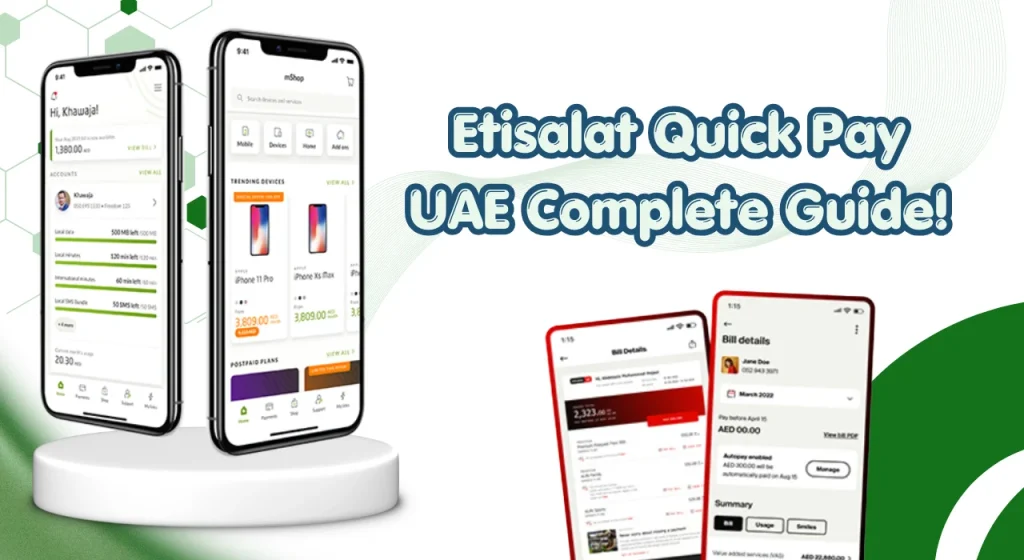
Whether you are paying a personal mobile bill, home internet charges, or managing business payments, Quick Pay offers a simple and secure option.
Khaleej Buzz explains how Etisalat Quick Pay works, who can use it, payment methods, common issues, and safety tips for UAE residents and businesses in 2026.
What Is Etisalat Quick Pay?
Etisalat Quick Pay is an online payment service that allows customers to pay bills and recharge prepaid services quickly. It is designed to make payments easier for users who may not wish to access their full online account for routine transactions.
The service supports different payment types for eligible personal and business services across the UAE.
How the service works
Quick Pay allows customers to enter their account details or mobile number, review the amount due, and make a secure payment using approved payment methods.
It can be used for:
The process is usually completed within a few minutes.
Who can use Etisalat Quick Pay?
Etisalat Quick Pay is suitable for:
Both personal and business users may use eligible services through etisalat quick pay personal and etisalat quick pay business payment options where available.
Can You Use Etisalat Quick Pay Without Logging In?
Yes, many Quick Pay services can be used without signing into an online account.
How guest payments work
Guest payments are designed for convenience. Users simply need to provide the required account details and complete the transaction.
Guest payments are useful when:
The quick pay etisalat service helps reduce unnecessary steps during payment.
When you may need to sign in
Some services may require account verification or access through your online profile.
You may need to sign in when:
What You Need Before Making a Payment
Preparing the required information can make the payment process smoother.
Required account or mobile details
Depending on the service, you may need:
Always double check the details before proceeding.
Accepted payment methods
Eligible payment methods generally include:
| Payment Method | Available |
| Debit Cards | Yes |
| Credit Cards | Yes |
| Selected UAE Banking Cards | Yes |
| Digital Payment Options | Where Available |
Availability may vary depending on service type and payment channel.
Important payment limits and conditions
Customers should remember that:
Checking the latest conditions before making large payments is recommended.
How to Pay Bills Using Etisalat Quick Pay
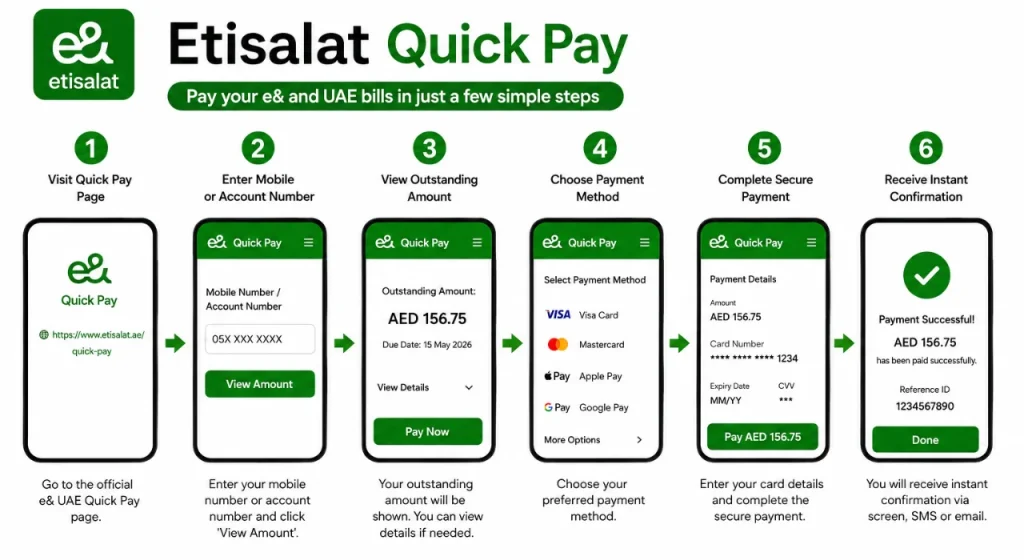
The etisalat quick pay online service makes bill payments simple.
Step 1: Open the official Quick Pay page
Visit the official Quick Pay portal using a secure internet connection.
Always check that the website address begins with https:// before entering payment details.
Avoid using links received through unknown emails or text messages.
Step 2: Enter your account or mobile details
Provide the correct information for the service you wish to pay.
This could include:
Check every digit carefully before continuing.
Step 3: Verify the outstanding bill
The system usually displays your current outstanding balance.
Review the following information:
If anything appears incorrect, stop the transaction and verify your account details.
Step 4: Choose the payment amount
You may have options such as:
Always review the total before moving to payment.
Step 5: Select a payment method
Choose your preferred payment card.
Before continuing, ensure:
Step 6: Complete the secure payment
Enter your payment card information securely.
Depending on your bank, you may receive:
Do not close your browser until payment processing finishes.
Step 7: Save the payment confirmation
After a successful payment, save your confirmation.
You can:
These details are useful if you need customer support later.
How to Recharge a Prepaid Mobile Number
Prepaid users can also benefit from Quick Pay services.
Recharge using Quick Pay
The etisalat quick pay recharge option allows customers to recharge prepaid mobile numbers online without unnecessary delays.
Choose a recharge amount
Available recharge values may vary depending on:
- Service eligibility
- Current promotions
- Minimum recharge requirements
Choose the amount that suits your needs.
Confirm and complete the recharge
Before submitting payment:
Recharge is often processed within minutes after successful payment.
Bonus credit and promotional offers (if available)
From time to time, eligible recharge promotions may include:
Promotional offers are subject to availability and may change without notice.
Services You Can Pay Using Etisalat Quick Pay
Quick Pay supports multiple services across eligible accounts.
| Service Type | What You Can Pay | Details |
| Mobile Bills | Postpaid mobile bills, additional service charges, outstanding balances | Use Etisalat Quick Pay to pay eligible mobile bills online quickly and securely without lengthy payment steps. |
| Home Internet Bills | Monthly subscription payments, outstanding charges, account settlements | Pay eligible home internet bills and manage pending payments conveniently through Etisalat Quick Pay. |
| Landline Services | Eligible landline bill payments | Landline subscribers can make supported bill payments online using the Quick Pay service. |
| Business Accounts | Routine business account payments and eligible service charges | Businesses can use Etisalat Business Quick Pay services to manage eligible account payments efficiently and securely. |
Payment Confirmation and Transaction Details
Keeping payment records is important for future reference.
How to know your payment was successful
Successful payments may include:
Where to find your transaction reference
Transaction reference numbers are usually provided immediately after payment completion.
Keep this number in case customer support assistance is required.
How to download or save your receipt
You can:
Common Etisalat Quick Pay Problems and Solutions
Although payments are usually straightforward, occasional issues can occur.
| Etisalat Quick Pay Issue | Quick Solution |
| Payment Failed | Check your card details, wait a few minutes, and try again. |
| Money Deducted but Bill Not Updated | Save your receipt and check your account status later. |
| Recharge Not Received | Verify the mobile number, recharge amount, and payment details. |
| Incorrect Mobile or Account Number | Double-check all details before submitting your payment. |
| Website Not Loading | Refresh the page, try another browser, or check your internet connection. |
| No Payment Confirmation Received | Check your email, SMS notifications, or payment history. |
| Multiple Charges | Avoid making repeated payments and contact support if needed. |
| Contact Customer Support | Seek assistance if your payment or recharge issue remains unresolved. |
Is Etisalat Quick Pay Safe?
Security remains an important part of online payments.
Security features
Quick Pay generally uses secure payment processing measures, including banking verification procedures for eligible transactions.
Safe online payment tips
Follow these simple practices:
Avoiding payment scams
Never share:
Be cautious of unofficial payment links shared through messages or social media.
Benefits of Using Etisalat Quick Pay
Quick Pay offers several practical benefits for UAE customers.
No login required for eligible payments
Many routine payments can be completed without accessing your full account profile.
Fast and convenient transactions
Payments usually take only a few minutes when account information is entered correctly.
Available 24/7
Customers can make eligible payments at any time.
Secure payment processing
Secure banking procedures provide additional protection during transactions.
Instant payment confirmation
Many successful payments provide immediate confirmation and transaction details.
Etisalat Quick Pay vs Other Bill Payment Methods
Choosing the right payment method depends on your needs.
| Payment Method | Best For | Key Features | Ease of Use |
| Etisalat Quick Pay | Fast bill payments and mobile recharges | No login required for eligible payments, online recharge services, and quick bill settlements | Very Easy |
| Mobile Application | Managing your account and payments | Bill payments, usage tracking, account management, and service updates | Easy |
| Online Account Portal | Detailed account management | Access billing history, multiple account management, and payment records | Easy |
| ATM Payments | Customers who prefer banking channels | Secure bill payments through supported UAE banking services | Moderate |
Conclusion
Etisalat Quick Pay continues to provide UAE customers with a convenient way to manage everyday payments in 2026. From mobile bills to prepaid recharges and eligible business services, the platform offers secure and flexible payment options.
Customers looking for account information may also find services such as Etisalat balance check, Lulu balance check, and prepaid card inquiry useful when managing their everyday finances and mobile services.
For consumer guidance and telecommunications information in the UAE, you may refer to the UAE government’s official resources:
FAQs
What is Etisalat Quick Pay?
It is an online payment service that allows eligible customers to pay bills and recharge services quickly and securely.
Can I use Etisalat Quick Pay without logging in?
Yes, many eligible payments can be completed without signing into an account.
Can I recharge a prepaid mobile number online?
Yes, eligible prepaid services can be recharged online through Quick Pay.
Can I pay another person’s bill?
Yes, provided you have the correct account or mobile details.
Which payment methods are accepted?
Eligible debit cards, credit cards, and selected banking payment options are commonly accepted.
Are international cards accepted?
Acceptance depends on banking policies and payment system requirements.
Is there a service fee for using Quick Pay?
Standard bill payments generally do not include additional service fees, although banking charges may apply in some situations.
What are the recharge and payment limits?
Limits may vary depending on the service type and payment conditions.
Can I make a partial bill payment?
Some eligible services allow partial payments.
How long does payment confirmation take?
Many payments are confirmed immediately, although occasional processing delays may occur.
What should I do if money is deducted but my bill is not updated?
Keep your receipt and transaction reference, then contact customer support if the account does not update after a reasonable period.