3 Simple Steps To Add Your Emirates ID to Your Phone Wallet (Apple & Samsung Wallet 2026)
Carrying your Emirates ID everywhere is important in the UAE, but you may not always have the physical card with you. A digital copy on your phone can make it easier to access your identity details when needed.
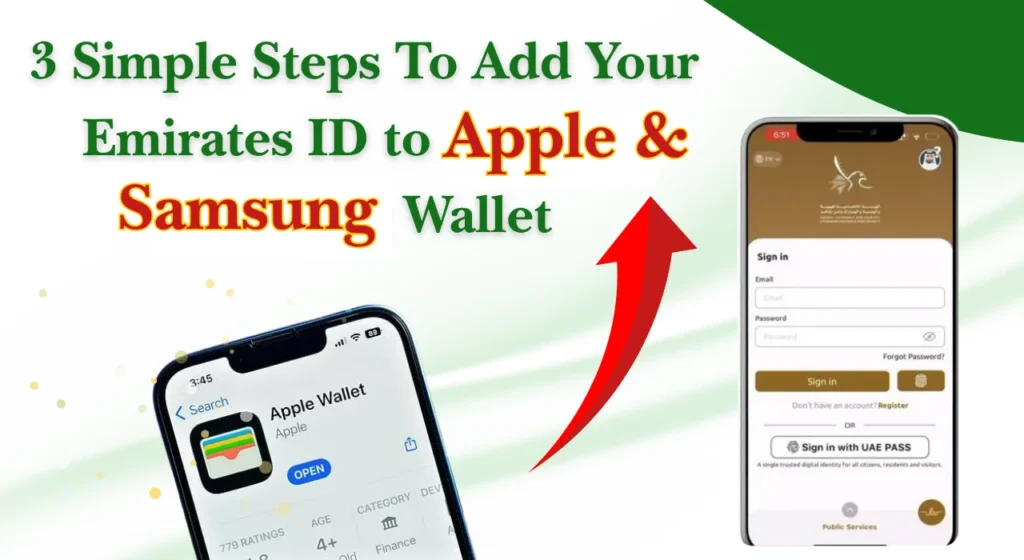
There is one important point to understand in 2026: an Emirates ID is not the same as a bank card or driving licence that can simply be added to every phone wallet.
Official UAE guidance confirms that the electronic version of the Emirates ID can be viewed through the official identity services on your phone.
Khaleej Buzz explains the practical ways to keep your Emirates ID available digitally, including what iPhone and Android users should know.
What Is a Digital Emirates ID?
A digital Emirates ID is an electronic version of your Emirates ID information that can be accessed through approved UAE digital services. It gives citizens and residents another way to view their identity details without relying only on the physical card.
The Federal Authority for Identity, Citizenship, Customs and Port Security confirms that after an ID card is issued, customers can view its electronic version through the official identity application. The digital ID can also be accessed through the UAE’s national digital identity service.
Requirements for Adding Your Emirates ID to a Phone Wallet
Before trying to put your Emirates ID on your phone, check that your identity information is active and that your phone can run the required official applications.
The main requirements normally include:
The exact options available on your phone may change as government digital services and wallet integrations are updated.
Essential Conditions to Check Before Adding Your ID
Start by checking whether your Emirates ID is valid and whether your personal information is correct. If your ID has recently been renewed, replaced or updated, allow the official system to reflect the latest information.
You should also make sure that your digital identity account is working. The UAE digital identity registration process can include scanning your Emirates ID, verifying your phone number and email, creating a PIN and completing face verification.
It is also better to install official applications only from recognised app stores. Avoid websites or unknown apps claiming to create an “Emirates ID wallet” because identity information is sensitive.
How to Add Your Emirates ID to Your Phone Wallet
The process is slightly different from adding a payment card. For an Emirates ID, the safest approach is to first set up your official digital identity and then check whether your device currently offers a supported wallet option.
1. Set Up the Required UAE Digital Identity App
First, install the official UAE identity application or access the approved digital identity service on your smartphone.
The official identity application provides access to identity and residency-related services, and its current features include a digital wallet for official documents.
After installation:
- Open the official application.
- Select the sign-in or registration option.
- Follow the identity verification instructions.
- Allow the required permissions.
- Check that your Emirates ID appears correctly.
Keep the application updated because digital document features can change over time.
2. Sign In and Verify Your Identity
Once the application is installed, sign in using your UAE digital identity account. Depending on your account status, you may need to complete additional verification.
Identity verification can involve your Emirates ID details, a one-time password and face recognition. These steps help make sure that the digital identity belongs to the correct person.
If your account is already active, the process should be quicker. If you have not registered before, complete the registration steps before trying to access your electronic ID.
Also Read: FAB Salary Card Balance Check 2026
3. Add Your Emirates ID to Your Phone Wallet
After your identity is verified, look for the digital documents or wallet section available in the official service.
If a supported option allows the document to be added to your phone’s wallet, follow the instructions shown on your device. Do not assume that every Emirates ID can currently be added directly as a standard wallet card.
If no “Add to Wallet” option appears, you can still use the official digital ID through the identity application. This is an important distinction because the availability of a direct phone-wallet feature can depend on current government and device support.
Also Read: EVG Fine Check UAE
How to Add Your Emirates ID on iPhone
Emirates ID is not currently available to add directly to Apple Wallet in the same way as some supported digital IDs.
How to Add Your Emirates ID on Android
Android users should follow the same basic principle. Install the official UAE identity application, sign in and check the available digital document options.
Some Android phones provide wallet functions for supported documents, payment cards and other credentials. However, support for an Emirates ID as a direct wallet item depends on the current service integration.
If your phone does not show an Emirates ID wallet option, you can still view the electronic ID through the official application. The official identity application is available for both Android and iPhone devices.
How to Access Your Emirates ID Digitally Without a Phone Wallet
A phone wallet is not the only way to keep your Emirates ID available digitally. In fact, the official UAE services provide other options that can be more reliable if direct wallet support is unavailable.
These options are useful if you change phones, use an older device or simply do not have a supported wallet feature.
Access Your Digital ID Through the UAE Digital Identity Service
The UAE’s national digital identity service allows users to identify themselves through their smartphone when accessing supported government and private-sector services.
It can also be used for digital document sharing and signing. The official UAE Government states that the service provides a single digital identity for accessing services across the UAE.
This means you may not need to carry a separate digital copy of your ID for every online transaction.
Get Your Digital ID Through the Official UAE Identity App
The official identity application is another direct way to view your electronic Emirates ID.
According to the Federal Authority for Identity, Citizenship, Customs and Port Security, the electronic version of the ID can be viewed after the card is issued. The application also provides identity, residency and other government-related services.
To access it, open the application, sign in and select the relevant identity or document section.
Download a Digital Emirates ID PDF
In some official digital services, you may also be able to obtain or download a copy of your Emirates ID document.
This can be useful when a business or organisation asks for a document copy rather than an identity verification through an app.
Keep any downloaded copy in a secure location. Avoid storing it in a public folder or sending it through unsecured channels because an Emirates ID contains personal information.
Use a QR Code for Temporary Digital ID Access
Some digital services may use QR codes or other verification methods to confirm identity during a transaction.
A QR code should only be used when it is generated by an approved service and is intended for that particular transaction. Do not scan unknown QR codes that claim to provide an Emirates ID copy.
The safest rule is simple: use the official application or government website when you need to verify your identity digitally.
How to Use Your Digital Emirates ID
Once your digital ID is available, open the official application and sign in whenever you need to view or use it.
Depending on the service, you may be able to show your identity details, share an approved digital document or use your digital identity to sign in to another service.
A digital ID can be particularly useful when you are completing online government transactions or dealing with organisations that accept digital identity verification.
Always check whether the organisation accepts the digital version before relying on it instead of the physical card.
Where Can You Use a Digital Emirates ID?
Digital identity services are increasingly used across government and private-sector services in the UAE. The national digital identity system is designed to let users authenticate themselves with supported service providers.
Common situations can include:
| Situation | How digital ID may help |
| Government services | Online identity verification and sign-in |
| Private-sector services | Identity authentication where supported |
| Digital applications | Confirming your identity without entering details repeatedly |
| Document services | Accessing or sharing supported digital documents |
| Online transactions | Secure authentication through approved services |
Acceptance can vary by organisation, so keep your physical Emirates ID available when a service specifically requires the original card.
How to Verify Your Digital Emirates ID
If any details are incorrect or outdated, contact the relevant UAE government authority for assistance.
For online authentication or verification, use the official UAE validation services rather than third-party websites or apps.
Adding Family Members’ Emirates IDs
Families may have several Emirates IDs to manage, especially when parents are handling documents for children or sponsored family members.
The official identity application includes family-related functions and a family tree feature for managing family and sponsored individuals’ services.
However, do not assume that another person’s ID can simply be added to your personal phone wallet. Access depends on the person’s relationship, authorisation and the service being used.
For important transactions, use the official account and follow the permissions shown by the service.
Is a Digital Emirates ID Safe?
A digital Emirates ID can be safe when accessed through official UAE services and protected with strong phone security.
Your smartphone should have a screen lock, PIN, fingerprint or face authentication enabled. You should also avoid sharing screenshots of your Emirates ID unless they are genuinely required.
Follow these basic safety rules:
The national digital identity system also uses identity verification features such as face recognition as part of secure registration.
Troubleshooting Common Digital Emirates ID Issues
Sometimes your Emirates ID may not appear immediately, or a wallet option may be missing. This does not necessarily mean there is a problem with your physical card.
Try these steps:
- Check that your Emirates ID is valid.
- Update the official identity application.
- Confirm that your phone number is correct.
- Check your internet connection.
- Sign out and sign in again.
- Restart your phone.
- Complete any pending identity verification.
- Check whether your device supports the required wallet feature.
If your recently renewed ID is not showing, give the government system time to update and check again later.
If the problem continues, use the official support channels rather than installing an unofficial application or giving your identity details to a third party.
Conclusion
Keeping your Emirates ID available on your phone can make daily tasks easier, especially when you need your identity details for online services. However, residents should not assume that an Emirates ID can always be added directly to a phone wallet like a payment card.
For 2026, the most dependable approach is to use the official UAE digital identity services to access your electronic Emirates ID. Set up your digital identity, complete verification and check the wallet options available on your particular device.
FAQs
Can I add my Emirates ID directly to my phone wallet?
Direct wallet support depends on the current device and government integration. If no official “Add to Wallet” option appears, use the electronic Emirates ID through the official UAE identity services instead.
Can I access my Emirates ID without the physical card?
Yes, the official UAE identity services provide an electronic version of the Emirates ID. The Federal Authority for Identity, Citizenship, Customs and Port Security confirms that it can be viewed through the official identity application and through the national digital identity service.
Is a digital Emirates ID accepted everywhere?
Not necessarily. Acceptance depends on the organisation and transaction. Some services support digital identity verification, while others may ask to see the physical card.
Can I download a copy of my Emirates ID?
Official digital services may allow you to obtain or download an electronic copy of the ID. The available options can depend on your account and the current application version.
What should I do if my Emirates ID is not showing in the application?
Check that your ID is valid, update the application and make sure your identity account is properly verified. If the issue continues, contact the official authority for assistance.