How to Check PayPlus Card Balance Online in UAE (2026 Guide)
If you receive your salary through a PayPlus card, regularly checking your balance is one of the easiest ways to stay on top of your finances.
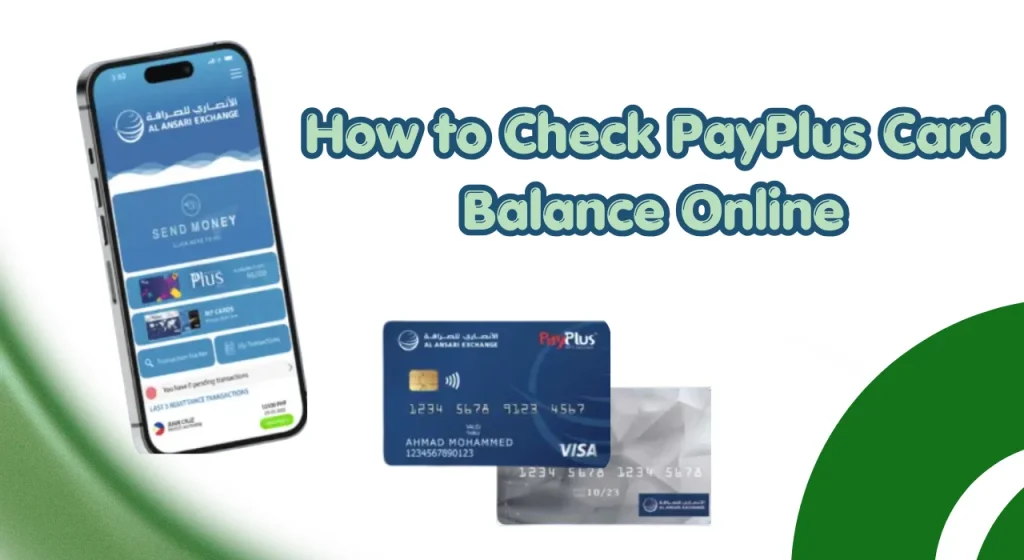
Whether you want to confirm that your salary has been credited, verify available funds before making a purchase, or monitor your monthly spending, knowing how to perform a PayPlus card balance check online can save time and help you avoid unexpected issues.
Khaleej Buzz explains how to perform an al ansari payplus card balance check online, the different balance enquiry methods available, common issues users face, and practical tips for managing your salary card effectively in 2026.
What Is a PayPlus Card?
A PayPlus card is a salary card commonly used by employers in the UAE to distribute employee wages through the Wage Protection System (WPS). Instead of receiving salaries through a traditional bank account, employees can receive their monthly payments directly onto their card.
The card allows users to withdraw cash, make purchases, check balances, review transactions, and access various financial services without needing a conventional banking relationship.
Many workers across the UAE use an al ansari payplus card because it provides easy access to salary payments while supporting secure financial transactions.
Key Features and Benefits of a PayPlus Card
The PayPlus card offers several practical features that make salary management easier.
Some of the main benefits include:
For employees who do not maintain a personal bank account, the card serves as a convenient way to access wages and manage everyday expenses.
PayPlus Card vs Traditional Bank Account
Although both options allow access to funds, there are some important differences.
| Feature | PayPlus Card | Traditional Bank Account |
| Salary Deposit | Yes | Yes |
| ATM Withdrawals | Yes | Yes |
| Cheque Book | No | Usually Available |
| Savings Features | Limited | Available |
| Account Opening Requirements | Simple | More Extensive |
| Online Access | Yes | Yes |
| Banking Products | Limited | Wide Range |
A PayPlus card is generally designed for payroll and salary access, while a traditional bank account offers additional banking products and services.
Why Checking Your PayPlus Card Balance Is Important
Regularly monitoring your Prepaid card balance helps you manage your money more effectively and avoid financial surprises.
Here are some important reasons to perform regular balance enquiries:
Keeping track of your available balance can help reduce financial stress and improve budgeting habits.
Quick Answer: How to Check PayPlus Card Balance Online
The fastest way to perform a payplus card balance check online is through the official online portal or authorised mobile application associated with the card.
Most users can check their balance within a few minutes by logging into their account and viewing their available funds.
Requirements Before Checking Your Balance
Before starting the balance enquiry process, ensure you have:
Having this information ready helps avoid delays during the verification process.
Information You May Need
Depending on the balance check method used, you may need:
- Card number
- User ID
- Registered mobile number
- Password
- One-time password (OTP)
Security verification steps help protect your account and personal information.
Fastest Balance Enquiry Methods in 2026
The most commonly used balance enquiry methods include:
- Online portal
- Mobile application
- ATM balance enquiry
- SMS service
- Customer support
For most users, online and mobile app methods remain the quickest options available.
All Available PayPlus Card Balance Check Methods in UAE
Several balance enquiry methods are available to accommodate different user preferences and accessibility needs.
Whether you prefer digital tools or in-person assistance, there is usually a suitable option available.
| Balance Check Method | How It Works | Best For | Availability | Key Benefits |
| Online Portal | Log in to the secure PayPlus web portal using your account credentials. | Salary verification, transaction history, account management | 24/7 | Fast access, detailed account information, secure login |
| Mobile App | Open the PayPlus mobile application and sign in to view your balance and recent transactions. | Users who need instant access on the go | 24/7 | Convenient, real-time updates, smartphone-friendly |
| ATM Balance Enquiry | Insert your card at a compatible ATM and select the balance enquiry option. | Users who prefer physical banking channels | ATM operating hours | Easy access, printed receipts may be available |
| SMS Balance Check | Send a request or use the registered mobile number to receive balance details via SMS (where supported). | Quick checks without internet access | Depends on service availability | Simple, accessible, works on basic mobile phones |
| Customer Service Support | Contact customer support and complete identity verification to receive account information. | Account-related queries and assistance | Customer service hours | Personalized support, issue resolution assistance |
| Branch Visit | Visit an authorized service center or branch and request balance information. | Users seeking face-to-face assistance | Branch operating hours | Direct support and account guidance |
| Self-Service Kiosk | Use available kiosks to check balance and access selected account services. | Quick in-person enquiries | Location dependent | User-friendly, self-managed account access |
PayPlus Card Balance Check Methods Comparison
The following table provides a quick overview of the most common balance enquiry options available in the UAE.
| Balance Check Method | Description | Speed | Availability | Best For |
| Online Portal | Check balance through official website using account login credentials | Very Fast | 24/7 | Quick balance checks and transaction reviews |
| Mobile App | Access account information through smartphone application | Very Fast | 24/7 | Daily monitoring and salary tracking |
| ATM Balance Enquiry | View balance using ATM card and PIN | Fast | ATM Operating Hours | Cash withdrawals and balance checks |
| SMS Service | Receive balance information through text message | Fast | Depends on Service Availability | Users without internet access |
| Customer Support | Contact support representatives for balance enquiries | Moderate | Business Hours or Hotline Availability | Account issues and assistance |
| Self-Service Kiosk | Check account details through authorised kiosks | Moderate | Location Dependent | In-person support needs |
PayPlus Card Balance Check Online (Official Method)
Online balance enquiry remains one of the most convenient ways to monitor your account.
It allows users to access their account information without visiting an ATM or service centre.
Eligibility and Requirements
To use online balance enquiry services, users generally need:
Some users may need to complete account registration before accessing online services.
Step-by-Step Online Balance Check Process
Follow these general steps to perform an al ansari payplus card balance check online:
- Visit the official card management portal.
- Enter your username or card details.
- Provide your password.
- Complete any security verification steps.
- Log into your account dashboard.
- View your available balance.
- Review recent transaction activity if required.
The exact screens may vary depending on system updates and account settings.
How to View Available Balance and Recent Transactions
After logging in successfully, users can usually access:
Reviewing transaction history regularly can help identify errors and improve financial awareness.
Common Online Login Issues and Fixes
Some users occasionally experience login problems when checking their balance online.
Common issues include:
| Issue | Possible Solution |
| Forgotten Password | Use password reset option |
| Incorrect Login Details | Verify username and password |
| OTP Not Received | Confirm registered mobile number |
| Locked Account | Contact customer support |
| Slow Website Loading | Check internet connection and try again later |
For additional consumer protection information in the UAE, users can review guidance provided by the official UAE government portal:
Keeping your login credentials secure and avoiding unofficial websites can help protect your account from fraud and unauthorised access.
PayPlus Card Balance Check Using Mobile App
The mobile application is one of the most convenient ways to perform a payplus card balance enquiry.
It allows users to check salary deposits, review transactions, and manage their card directly from a smartphone. Many UAE residents prefer this method because it is fast, secure, and available 24/7.
How to Download and Register the Mobile App
To start using the app for your al ansari payplus card balance check online, you first need to install and register your account.
Follow these steps:
- Download the official mobile app from Google Play Store or Apple App Store.
- Open the app and select “Register”.
- Enter your PayPlus card details.
- Provide your registered mobile number.
- Verify your identity using OTP.
- Create a secure login password.
- Complete setup and log in.
Once registration is completed, you can access all card services from your dashboard.
Step-by-Step App Balance Check Process
After logging into the app, checking your balance is simple:
- Open the mobile app.
- Log in using your credentials.
- Go to the “Account Summary” section.
- View available balance instantly.
- Check recent transactions for salary updates or deductions.
The app updates balance information in real time, making it one of the fastest ways to monitor your funds.
Checking Salary Credits Through the App
Many users rely on the app specifically to confirm salary deposits. This is especially helpful on payday when employees want instant confirmation.
The app allows you to:
- View salary credit notifications
- Check employer deposit details
- Track monthly salary history
- Compare past salary cycles
Additional Features Available in the App
The mobile app offers more than just balance checking. It also helps users manage their financial activities efficiently.
Mobile App Troubleshooting Tips
Sometimes users may face issues while using the app. Common problems and solutions include:
| Issue | Solution |
| App not opening | Update to latest version |
| Login failure | Reset password or check credentials |
| OTP not received | Check mobile network and number registration |
| Balance not updating | Refresh app or log out and log in again |
| App crash | Clear cache or reinstall app |
If problems persist, users can contact customer support for assistance.
PayPay Salary Card Balance Check at ATMs
ATM balance enquiry remains a widely used method across the UAE. It is especially helpful for users who prefer physical verification of their account balance.
Step-by-Step ATM Balance Check Process
To check your balance at an ATM:
- Insert your PayPlus card into the ATM machine.
- Enter your PIN securely.
- Select “Balance Enquiry” from the menu.
- Wait for the system to process your request.
- View your balance on screen or printed slip.
Supported ATM Networks in UAE
PayPlus cards are generally supported across multiple ATM networks in the UAE, including:
- Major bank ATMs
- Exchange house ATMs
- Partner financial networks
Always ensure the ATM displays compatibility before inserting your card.
Checking Balance at FAB ATMs
Some users prefer using major bank ATMs for added reliability. At these machines:
These ATMs are widely available across malls, business areas, and residential locations.
ATM Balance Enquiry Fees and Charges
In most cases, basic balance enquiries may be free or low-cost depending on the service provider. However:
Always check the fee display before confirming transactions.
Common ATM Errors and Solutions
| Problem | Solution |
| Card not reading | Clean card or try another ATM |
| Incorrect PIN | Re-enter carefully or reset PIN |
| Transaction declined | Check available balance |
| ATM out of service | Use another nearby machine |
| Network error | Wait and retry later |
PayPlus Card Balance Check via SMS
SMS services provide a simple alternative for users who do not have internet access. This method allows users to receive balance updates directly on their registered mobile number.
SMS Registration Requirements
To use SMS services, users typically need:
Registration is usually done through the service provider or customer support.
Charges and Limitations of SMS Services
While SMS balance enquiry is convenient, it may have certain limitations:
Check PayPlus Card Balance Through Customer Support
Customer support services help users check balances and resolve account-related issues. This method is useful when other digital options are not accessible.
Customer Care Helpline Method
Users can contact the support hotline and request balance information after completing identity verification.
Steps include:
- Call the official helpline number.
- Select balance enquiry option.
- Provide card and identity details.
- Receive balance information from a support agent.
Information Required for Verification
To protect user accounts, verification may require:
- Card number
- Registered mobile number
- Date of birth or ID details
- Security questions
In-Branch and Self-Service Kiosk Balance Enquiry
Some users prefer visiting physical service locations for assistance. Self-service kiosks and branches provide secure access to account services.
How Self-Service Kiosks Work
Self-service kiosks allow users to:
- Insert card or scan details
- Enter PIN or verification code
- Check balance instantly
- Print mini statements if required
These kiosks are usually located in service centres and partner outlets across the UAE.
How to Create an Online Account for Balance Enquiry
To use online services for your payplus card balance check online, you may need to create and activate an online account. This helps you securely access your balance, transaction history, and salary updates anytime.
Registration Requirements
Before you start, make sure you have:
These details are used to verify your identity and protect your account from unauthorised access.
Step-by-Step Account Creation Process
Follow these simple steps to register:
- Visit the official online portal for PayPlus services.
- Click on “Register” or “Create Account”.
- Enter your PayPlus card number.
- Provide your registered mobile number.
- Enter OTP sent to your phone.
- Create a secure username and password.
- Complete profile setup and log in.
Once completed, you can immediately access your account dashboard.
Also Read: Lulu Balance Check
Account Verification and Activation
After registration, some users may need additional verification steps:
Once verified, full access to balance enquiry and account services is enabled.
Common Registration Errors
Users sometimes face issues during registration. Common problems include:
| Issue | Solution |
| Invalid card details | Recheck card number carefully |
| OTP not received | Check mobile network or resend OTP |
| Mobile number mismatch | Ensure number is registered with your card |
| System error | Try again after a few minutes |
| Password not accepted | Use a stronger password with numbers and symbols |
PayPlus Card Balance Check Methods Comparison
Different users prefer different methods depending on convenience, speed, and accessibility. The table below compares all major options for checking your al ansari exchange payplus card balance.
Comparison Table: Online vs App vs ATM vs SMS vs Customer Support
| Method | Speed | Convenience | Availability | Charges | Recommended Usage |
| Online Portal | Very Fast | High | 24/7 | Usually Free | Full account access and detailed balance check |
| Mobile App | Very Fast | Very High | 24/7 | Free | Daily balance tracking and salary alerts |
| ATM | Fast | Medium | ATM hours | Low / Variable | Cash withdrawal + balance check |
| SMS Service | Fast | High | Limited | May Apply | Quick balance check without internet |
| Customer Support | Moderate | Medium | Limited hours | Usually Free | Account issues and verification help |
Common PayPlus Card Balance Issues and Solutions
Sometimes users may face issues while checking their payplus card balance. These problems are usually simple to fix once identified.
Benefits of Regular PayPlus Card Balance Monitoring
Checking your balance regularly helps you stay in control of your money and avoid financial stress.
Tips for Managing Your PayPlus Salary Card Effectively
To make the most of your payplus card, follow these simple but effective tips:
Common Mistakes to Avoid When Checking PayPlus Card Balance
Many users make simple mistakes that can lead to delays or security risks.
- Use Only Official Platforms: Avoid fake websites, suspicious links, and unverified apps when checking your PayPlus card balance.
- Protect Your Account Information: Never share OTPs, passwords, login credentials, or card details with anyone.
- Pay Attention to Transaction Alerts: Review failed payments, declined withdrawals, and pending transactions to prevent account issues.
- Keep Your Mobile Number Updated: An outdated phone number can cause missed OTPs, login problems, and lost account notifications.
- Report Suspicious Activity Immediately: If you notice unauthorized transactions, block your card and contact customer support without delay.
Conclusion
Checking your PayPlus card balance online in the UAE is simple, fast, and available through multiple channels such as mobile apps, online portals, ATMs, SMS services, and customer support.
For UAE residents and salary card users, regular balance monitoring is not just about checking funds, it is an important habit for financial control, salary tracking, and fraud prevention.
By using secure methods and staying updated with your transactions, you can manage your payplus card balance more effectively and avoid common financial issues in daily life.
FAQs
How Can I Check My PayPlus Card Balance Online?
You can check your balance by logging into the official online portal or mobile app, entering your card details, and viewing your available balance in the dashboard.
How Can I Check My PayPlus Salary Balance Through Mobile App?
Download the official app, log in using your credentials, and go to account summary to view your salary and available balance instantly.
Is PayPlus Balance Enquiry Free?
Yes, most online and app-based balance checks are free, while ATM or SMS services may have small charges depending on the provider.
Why Is My Salary Not Showing on My PayPlus Card?
It may be due to payroll processing delays, banking hours, or employer submission timing. Wait 24–48 hours or contact HR if needed.
What Should I Do If My Balance Is Incorrect?
Check transaction history first, then contact customer support if you notice missing or incorrect entries.
How Do I Reset My PayPlus Card PIN?
You can reset your PIN through the mobile app, online portal, or by contacting customer support for verification.
How Often Should I Check My Card Balance?
It is recommended to check at least once a week or immediately after salary credit.
What Is the Fastest Way to Check My PayPlus Card Balance in 2026?
The mobile app is the fastest and most convenient method for instant balance updates and salary tracking.