DEWA Bill Check Online 2026: Easy Ways to View, Download & Pay Your Bill
Checking your electricity and water bill in Dubai is simple when you have your DEWA account or premise details. A DEWA bill check lets you view your current amount, outstanding balance, billing details and payment status without visiting a customer centre.
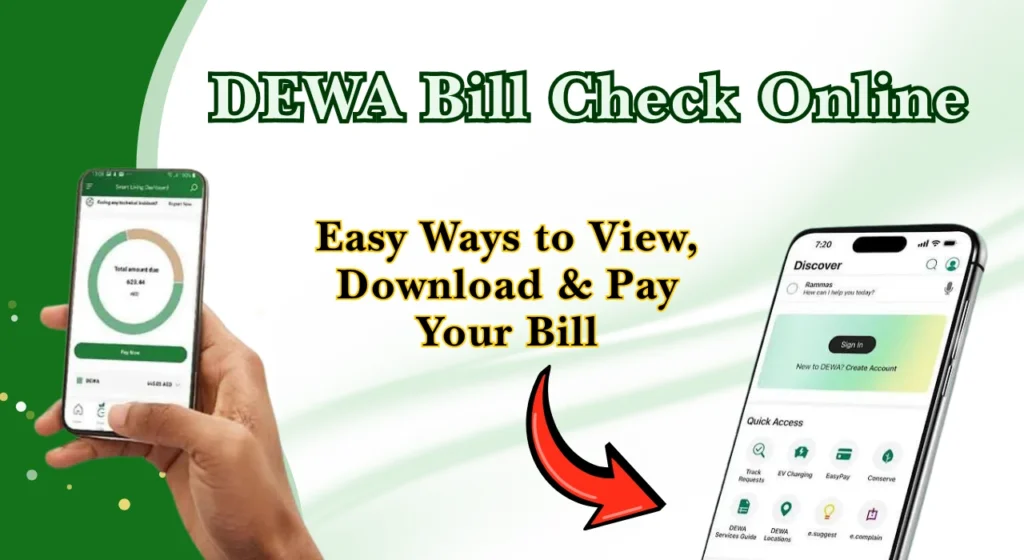
Dubai residents can use online services, the smart app and other approved digital channels to view or pay their bills. The official online bill service accepts an account or premise number for checking bills.
This guide explains the main ways to check your bill, download a copy, view older bills and complete your DEWA bill payment online.
What Is a DEWA Bill?
A DEWA bill is the monthly statement for electricity and water services at a property in Dubai. It shows your consumption, applicable charges, VAT and the total amount that needs to be paid.
Your bill can also contain other amounts linked to your account or property, depending on the services being provided. Checking the statement before payment helps you understand why the amount has changed from the previous month.
For residents, the bill is useful for tracking household utility costs. For landlords and businesses, it can also help with account records and property-related expenses.
Information Included in a DEWA Bill
Your bill contains several sections. The exact charges can vary depending on your property, account type, consumption and services.
Bill Summary and Account Details
The summary normally contains key information such as your account number, premise number, billing period, invoice details and total amount due.
You may also see the current month’s charges, VAT and other amounts linked to the account. Keep your account and premise numbers safely available because they are useful for future bill enquiries.
Electricity Charges
The electricity section shows how much electricity was used during the billing period. It can include the meter reading, consumption, applicable tariff and related charges.
Water Charges
The water section shows your recorded water consumption and related charges. Your usage may change because of household size, leaks, irrigation or other water needs.
Other Services and Additional Charges
A DEWA statement may include charges for additional services or adjustments related to your account. These could vary according to the service used.
Always check the description of an unfamiliar charge instead of assuming it is part of normal electricity or water consumption.
Property or Service Charges
Some properties can have additional service-related amounts displayed on the utility statement. These depend on the property and the services connected to the account.
What Is a DEWA Premise Number?
A premise number identifies the specific property connected to the utility account. In Dubai, the premise number is commonly a 9-digit number associated with the property.
You may need it when checking a bill, activating or deactivating a connection, or completing other utility services. The official premise-number service allows customers to search using details such as an application number, contract account number, plot number, Makani number, Emirates ID number, meter number or trade licence number.
If you cannot find your premise number, use the official service rather than guessing the number.
How to Check DEWA Bill Online
There are several ways to complete a DEWA bill check online. The best method depends on whether you have your account number, premise number, smartphone access or login details.
Check Your Bill Using Your Account Number
The account number is one of the easiest details to use for an online bill enquiry. Open the official bill-view service and enter the requested account information.
Dewa Bill Check Using Premise Number
If you do not have your account number, your premise number may help you access the bill-check service.
Check Your Bill Through the Smart App
The official smart app provides access to several account and billing services from a mobile device. Depending on your account and service, you can view bills, check payment information and manage utility services.
This is a useful option if you regularly check your bill from your phone.
Dewa Bill Check Via EasyPay
EasyPay can be used as another digital route for eligible billing enquiries and payments.
It is particularly useful when you want a quick way to handle a bill without going through a full account dashboard.
How to Check DEWA Bill Online Step by Step
If you only need your current bill, the process is usually quick. Follow these steps:
Open the Online Bill Check Service
Start with the official online bill-view service. Avoid entering your account details on unknown websites or pages that ask for unnecessary personal information.
Enter Your Account or Premise Number
Enter your account number or premise number in the appropriate field. Check the number carefully before selecting the enquiry or view option.
Review Your Current Bill
Once the bill appears, check the billing period, consumption, total amount and any outstanding balance.
If the amount looks unusual, compare it with your previous usage before making payment.
Sign In for Full Billing History
Signing in to your account can provide access to additional account and billing information. The official FAQ states that customers can view recent bills and payment history through the Smart Living Dashboard.
Download or Save Your Bill as a PDF
If you need the bill for your records, save or download the available digital copy. A PDF can be useful for rental records, business accounts, personal budgeting or future enquiries.
Pay Your Outstanding Bill or Investigate an Issue
After checking the amount, you can pay it through an approved payment channel. If something does not look correct, contact customer support before making assumptions about the charge.
How to Check DEWA Bill Without Login
For a basic DEWA bill enquiry, you may not always need to sign in to a full account dashboard. The official View Bill service asks for an account or premise number and provides access to the bill-view function.
This can be useful when you only want to check the current amount. However, login may be needed for account management, history and certain other services.
What to Do If Your DEWA Bill Is Not Showing Online
If your bill does not appear, first check that the account or premise number is correct. A typing error is one of the simplest issues to rule out.
You can also try the service again later or use another official digital channel. If the problem continues, contact customer support and provide the relevant account details.
Do not repeatedly submit payment if you are unsure whether an earlier transaction was successful. First confirm the payment status.
How to Download Your DEWA Bill PDF Online
After opening your digital bill, look for the available download, print or save option.
- Open your DEWA bill
Access your digital DEWA bill and open the bill you want to download. - Look for the download option
Find the Download, Save, or Print option on the bill page. The option may look different depending on your device or browser. - Choose “Save as PDF”
If you see a print option, select it and choose Save as PDF as the printer or destination. - Select where to save the file
Choose a folder on your phone, tablet, or computer where you can easily find the bill later. - Give the file a clear name
Use a simple name that includes the property and billing month, such as DEWA_Bill_Apartment_August_2026.pdf. - Save the PDF
Click Save or Download to store the bill on your device.
How to Check Old DEWA Bills and Billing History
Older bills can be useful when comparing your electricity and water consumption. They can also help when checking whether an unusual charge is a one-time adjustment or part of a longer trend.
The official FAQ says customers can view billing and payment history through the Smart Living Dashboard, including the last 13 months of bills and payment history.
How to Check Your Outstanding Amount and Due Date
Your current bill shows the amount that needs to be paid and the relevant billing information. Before paying, check that the account or property details match the service you intend to pay.
If you have more than one property or account, be especially careful when selecting the bill. This is important for landlords, property managers and businesses with several premises.
How to Pay Your DEWA Bill Online
DEWA bill payment can be completed through several approved digital and payment channels. The official payment service states that customers can use available payment partners and digital channels to pay monthly bills and outstanding amounts.
For online payment:
- Check your current bill and outstanding amount.
- Select an approved payment option.
- Enter the required account or payment reference.
- Confirm the amount and account details.
- Complete the payment.
- Save the payment confirmation for your records.
For the latest payment options, use the official DEWA bill payment channels rather than relying on old payment information.
What Details Do You Need for a DEWA Bill Check?
The information required depends on the method you choose. Keep these details available where applicable:
| Detail | Why it may be needed |
| Account number | Used for bill enquiries and payments |
| Premise number | Identifies the connected property |
| Registered mobile number | May be needed for verification |
| Registered email | Useful for account communication |
| UAE Pass | Used for supported digital sign-in services |
| Payment reference | May be required for certain payment channels |
Never share verification codes, passwords or other sensitive login information with another person.
How to Activate & Deactivate DEWA Connection
When moving into a Dubai property, you can activate your DEWA electricity and water connection by submitting the required property and customer details through the official service. Tenants should keep their tenancy documents and identification details ready.
When moving out, submit a DEWA deactivation request and settle any outstanding or final bill. Completing the process before moving can help ensure a smooth connection closure.
DEWA Connection Fees and Additional Charges
Connection-related costs depend on the service and circumstances of the application. Additional amounts can also appear when a customer requests certain services or account changes.
Because fees and service requirements can change, check the current official service information before starting a new connection or making a payment.
For related UAE financial checks, some readers may also search for Fab balance check and Ratibi card check. These are separate services and should not be confused with a utility bill enquiry.
What to Check After Viewing Your DEWA Bill
Before completing your DEWA bill payment online, review the important details.
Check:
A quick review can help you identify an unexpected increase before you pay.
DEWA Consumer Sign-In and UAE Pass
UAE Pass can be used for supported government and digital services, including eligible account sign-in routes. It provides a convenient way to verify your identity without creating separate login details for every supported service.
If you are using a shared or public device, always sign out after completing your bill enquiry or payment.
Customer Service and Support for DEWA Bill Issues
If your bill has an unexpected charge, payment problem or account issue, use the official customer service channels. Keep your account number, premise number and payment reference available when contacting support.
For current services, enquiries and customer support information, visit the official DEWA website.
Conclusion
A DEWA bill check is useful for anyone living, renting or running a business in Dubai. You can check the current bill, review consumption, view outstanding amounts, access billing history and make payments through approved digital channels.
For a quick enquiry, your account or premise number may be enough. If you need older bills or wider account services, signing in can provide more information.
Always check the account details and amount before making a DEWA bill payment, and use official UAE government channels for your personal and payment information.
FAQs
Can I check my DEWA bill online without logging in?
Yes, the online View Bill service can be used with an account or premise number for a basic bill check. Full account history and some account-management services may require sign-in.
Can I check my DEWA bill using a premise number?
Yes. The official bill-view service accepts a premise number as one of the available details for viewing a bill.
How can I download my DEWA bill?
Open your digital bill and use the available download or print option to save a copy. If you need older bills, sign in to your account and check the available billing history.
How can I check my previous DEWA bills?
You can check recent billing and payment history through the available account dashboard. The official FAQ states that the Smart Living Dashboard provides access to the last 13 months of bills and payment history.
Can I check and pay someone else’s DEWA bill?
Yes, an approved service allows customers to view and pay another person’s bill using the required account or premise details.